Best Loopback Alternatives for Mac (2026)
Loopback by Rogue Amoeba is the best-known audio-routing app on the Mac: it creates virtual audio devices, captures sound from apps and microphones, and lets you wire them together on a drag-and-drop canvas. It's mature, polished, and deep. It also costs $99.
That price is why you're here. If you only need audio routing a few times a month, to pipe a browser tab into a call, record app audio, or feed a DAW, $99 is a lot of software for the job. The good news is that in 2026 there are real alternatives at every price, including free and built-in ones.
The alternatives at a glance
| Tool | Price | Routing UI | Per-app capture | Best for |
|---|---|---|---|---|
| SoundPipe | $10 one-time | Yes | Yes | Loopback's core job at a tenth of the price |
| BlackHole | Free | No (Audio MIDI Setup) | No | A plain virtual device, DIY wiring |
| Audio MIDI Setup | Built into macOS | Partial | No | Combining output devices, nothing more |
| Audio Hijack | $69 one-time | Yes (recording-focused) | Yes | Recording workflows, not live routing |
| SoundSource | $49 one-time | No (volume control) | No | Per-app volume/EQ, not routing |
| Loopback (baseline) | $99 one-time | Yes | Yes | Multichannel and edge-case setups |
1. SoundPipe: Loopback's core job for $10
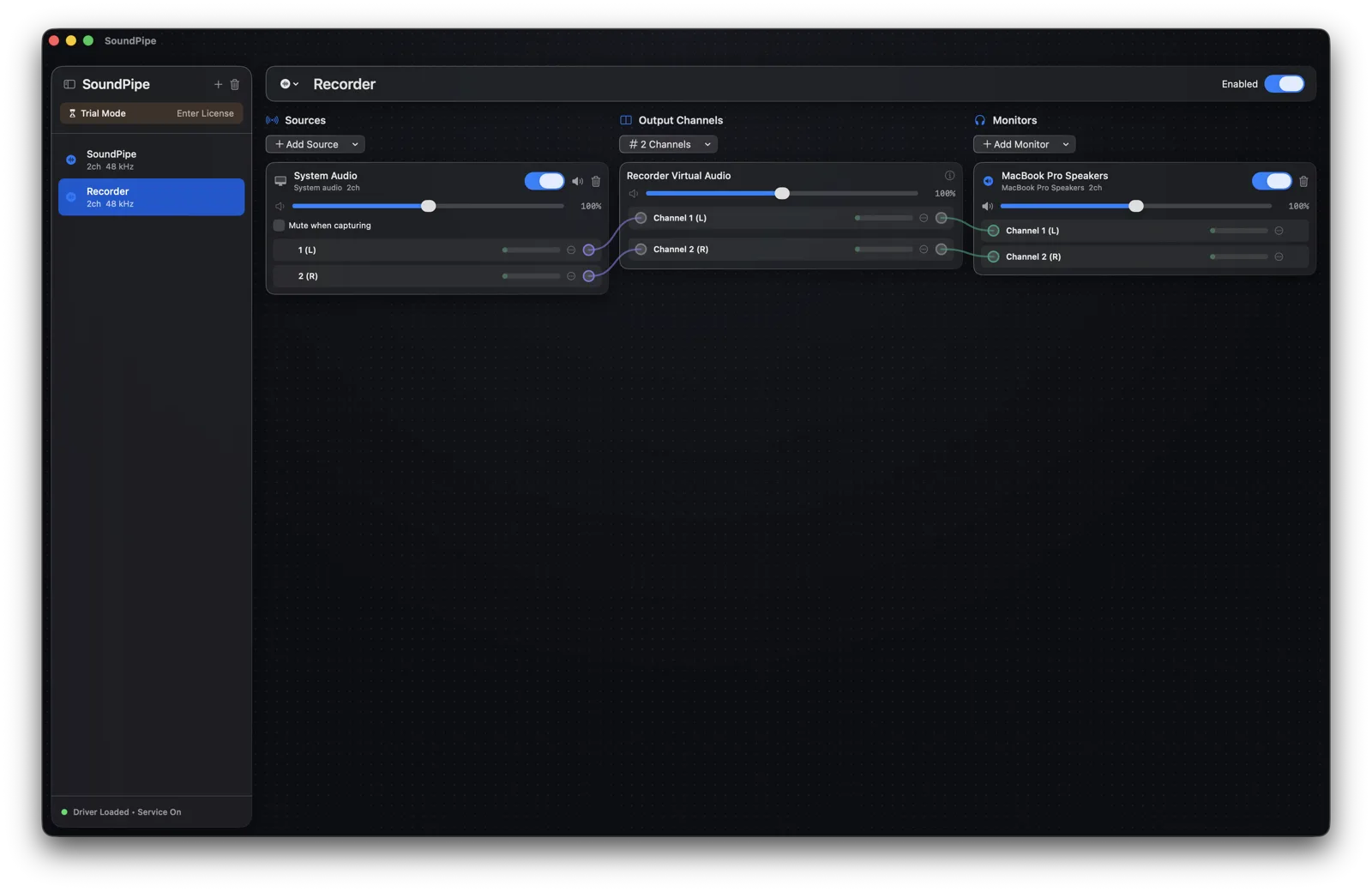
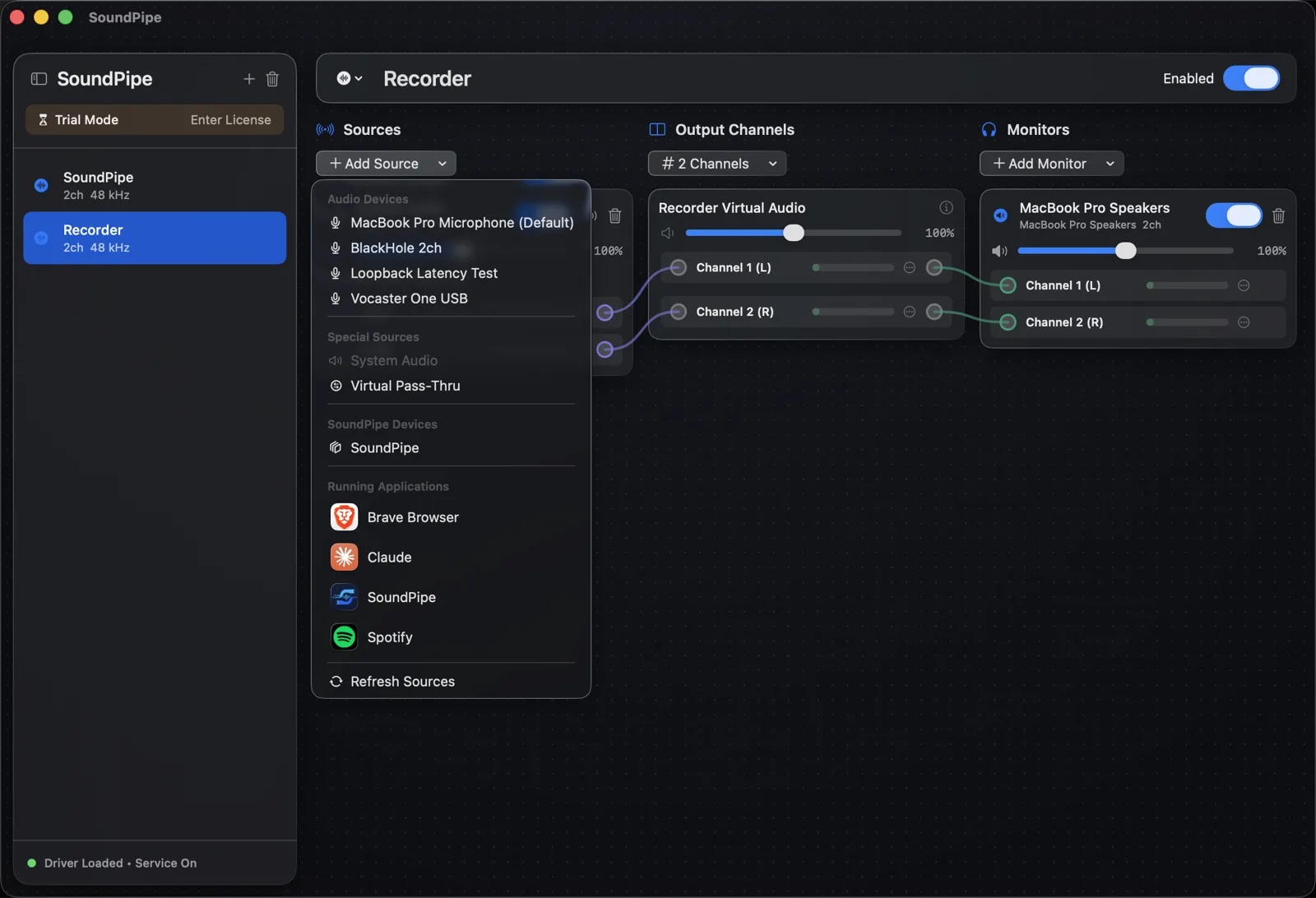
SoundPipe is built around the same idea as Loopback: create virtual audio devices, add sources (an app, all system audio, or a microphone), wire channels with drag-and-drop, and monitor through your speakers while you route.
What it covers:
-
Virtual devices, live. Create up to 16 devices from the app, rename and resize them (2 to 64 channels) without restarting anything.
-
Per-app capture. Route just Spotify, or just the call. This is the part the free options below can't do.
-
Mixing and volume. Multiple sources into one device, per-channel sliders, live meters.
-
Monitoring. Hear what you route through headphones or speakers, no multi-output workarounds.
-
Sample rates handled automatically, with latency under 15 ms.
Where Loopback is still ahead: it can capture multichannel audio from an app, while SoundPipe's app capture is stereo. If you work in surround, Loopback earns its price. See our full SoundPipe vs Loopback comparison for an honest side-by-side.
It's $10 once, the license covers 3 Macs, and the trial runs the complete app in 20-minute sessions, restartable as often as you like. Download SoundPipe free and try your actual workflow before paying anything.
2. BlackHole: the best free Loopback alternative
BlackHole is a free, open-source virtual audio driver, and it's the honest answer to "is there a free Loopback alternative?" One big caveat comes with it: BlackHole is a driver, not an app. There is no window, no wiring canvas, no volume control. You get a virtual device that shows up in your sound settings, and everything else is up to you.
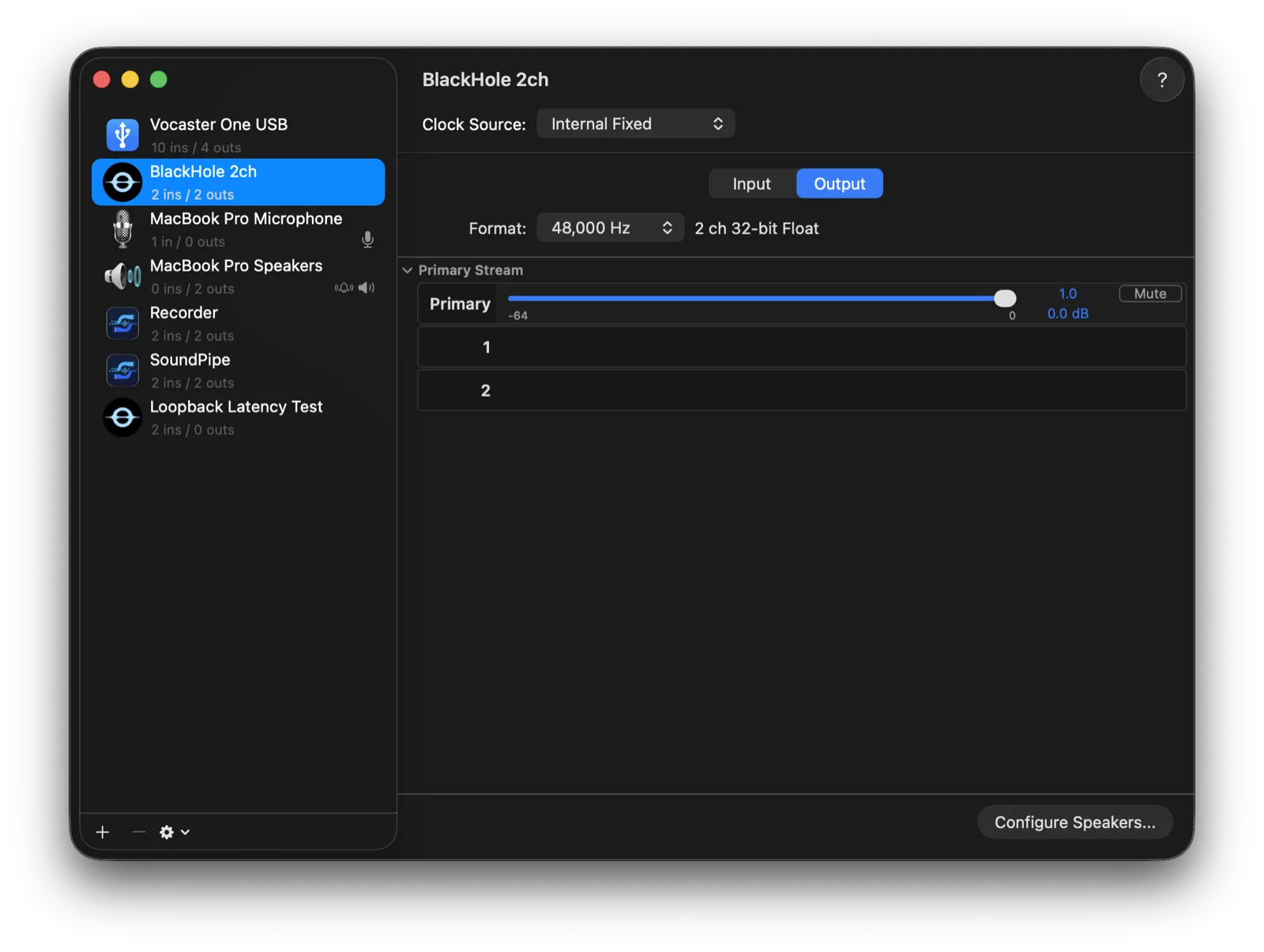
The classic recipe: set your Mac's output to BlackHole, then record from BlackHole as an input. It works, but your speakers go silent the moment you switch output, so to hear anything you open Audio MIDI Setup and hand-build a multi-output device combining BlackHole and your speakers. Every device in the chain must run at the same sample rate or you get silence or crackling, multi-output devices ignore your volume keys, and the channel count is fixed per build (2ch, 16ch, and 64ch are separate installers).
If you're comfortable being your own audio engineer, BlackHole is genuinely excellent: free, GPL-licensed, rock solid, and effectively zero latency. If you'd rather not maintain the wiring yourself, that's exactly the gap paid tools fill. We compare them feature by feature in SoundPipe vs BlackHole.
3. Audio MIDI Setup: already on your Mac
Before installing anything, know what macOS itself can do. Audio MIDI Setup (in /Applications/Utilities) can build two kinds of combined devices:
- A multi-output device plays the same audio to two or more outputs at once (speakers plus HDMI, say).
- An aggregate device combines several inputs and outputs into one device with more channels, mostly for audio interfaces in DAWs.
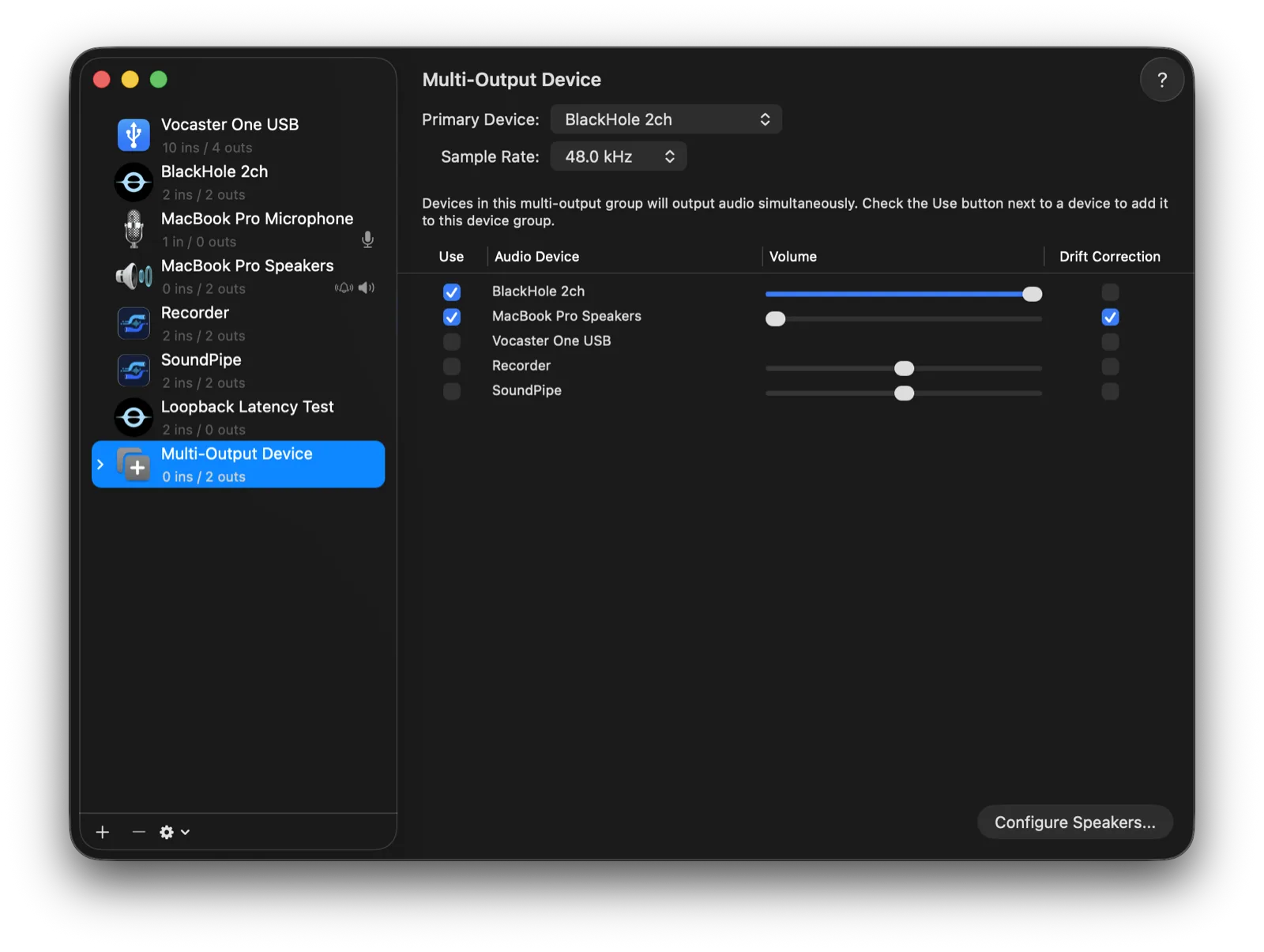
That's the full list. It cannot capture an app's audio, route between apps, or give you per-app volume, and multi-output devices don't respond to the volume keys. But if your entire problem is "I want sound on two outputs at once," it's free, built-in, and you're done. No download required.
4. Audio Hijack: when recording is the actual goal
Audio Hijack ($69) is Loopback's sibling: same developer, different job. It captures audio from any app or input and runs it through a block-based pipeline of effects, recorders, and outputs, with scheduling and session presets.
If what you really want from "a Loopback alternative" is recording (grabbing a stream, capturing calls, archiving radio), Audio Hijack is arguably the better Rogue Amoeba product for you, and it's $30 cheaper. What it isn't is a virtual-device factory: it doesn't create system-wide devices other apps can select, so for live routing between apps you're back to Loopback or the tools above.
5. SoundSource: per-app volume, not routing
SoundSource ($49), also from Rogue Amoeba, sits in your menu bar and gives every app its own volume slider, EQ, and output device. Sending Spotify to headphones while a video plays on speakers is exactly its territory, and it's very good at it.
It makes this list because people often reach for Loopback when per-app volume or per-app output is all they actually need. But it creates no virtual devices and can't feed one app's audio into another, so it's a complement to the tools above rather than a replacement for them.
What Loopback still does better
An honest wrap-up, since the point of this page isn't to pretend the incumbent is bad:
- Multichannel app capture. SoundPipe captures app and system audio in stereo (hardware inputs keep their full channel count). Loopback can pull multichannel audio out of an app, which matters if you work in surround.
- Ecosystem. Loopback, Audio Hijack, and SoundSource are designed to work together.
If you need all of that, buy Loopback. Most people don't. They need one or two virtual devices, app capture, volume control, and monitoring.
Bottom line
- Want it free and don't mind manual setup? BlackHole + Audio MIDI Setup.
- Just need sound on two outputs? Audio MIDI Setup alone. It's already installed.
- Recording-first workflow? Audio Hijack.
- Per-app volume only? SoundSource.
- Loopback's core job without the $99? Try SoundPipe free: the full app in 20-minute trial sessions, $10 once if it fits.