Best Soundflower Alternatives for Mac (2026)
For over a decade, Soundflower was the answer to "how do I route audio between apps on a Mac?" It was free, it was everywhere, and every tutorial about recording system audio started with "install Soundflower."
Those tutorials are now wrong. Soundflower's last release, 2.0b2, shipped in December 2014. It's a kernel extension, a technology Apple has been phasing out since macOS Catalina, and it was never built for Apple Silicon. On an M-series Mac it cannot work at all, and its own GitHub page is marked deprecated. If the installer failed on your machine or the devices never showed up, nothing is wrong with your Mac. The software's time has simply passed.
The good news: everything Soundflower did is done better today, and the direct successor is still free.
The alternatives at a glance
| Tool | Price | What it is | Best for |
|---|---|---|---|
| BlackHole | Free | A virtual audio driver, like Soundflower was | Soundflower's exact job, on modern Macs |
| SoundPipe | $10 one-time | Driver plus a routing app | The same job without the manual setup |
| Audio MIDI Setup | Built into macOS | Combines output devices | Sound on two outputs at once, nothing more |
| Loopback | $99 one-time | Professional routing suite | Multichannel and edge-case setups |
| Audio Hijack | $69 one-time | Recording pipeline app | Recording-first workflows |
Why Soundflower stopped working
Soundflower loads into the kernel, and modern macOS treats third-party kernel extensions as a legacy liability: they need explicit approval and restarts to load, and on Apple Silicon they require booting into Recovery to lower the security policy. Even that last resort doesn't help here, because Soundflower has no Apple Silicon build to load in the first place.
Apple's replacement API (AudioServerPlugIn) runs audio drivers in user space instead, and every tool below is built on it. That's the whole story: Soundflower isn't broken so much as it belongs to an era of macOS that no longer exists. We cover the details in our SoundPipe vs Soundflower status report.
1. BlackHole: the direct free successor
BlackHole is the honest first recommendation, because it is Soundflower, rebuilt properly: a free, open-source virtual audio driver on Apple's current API, signed, notarized, and actively maintained. It works on Intel and Apple Silicon alike. If you liked Soundflower, you can swap in BlackHole and carry on exactly as before.
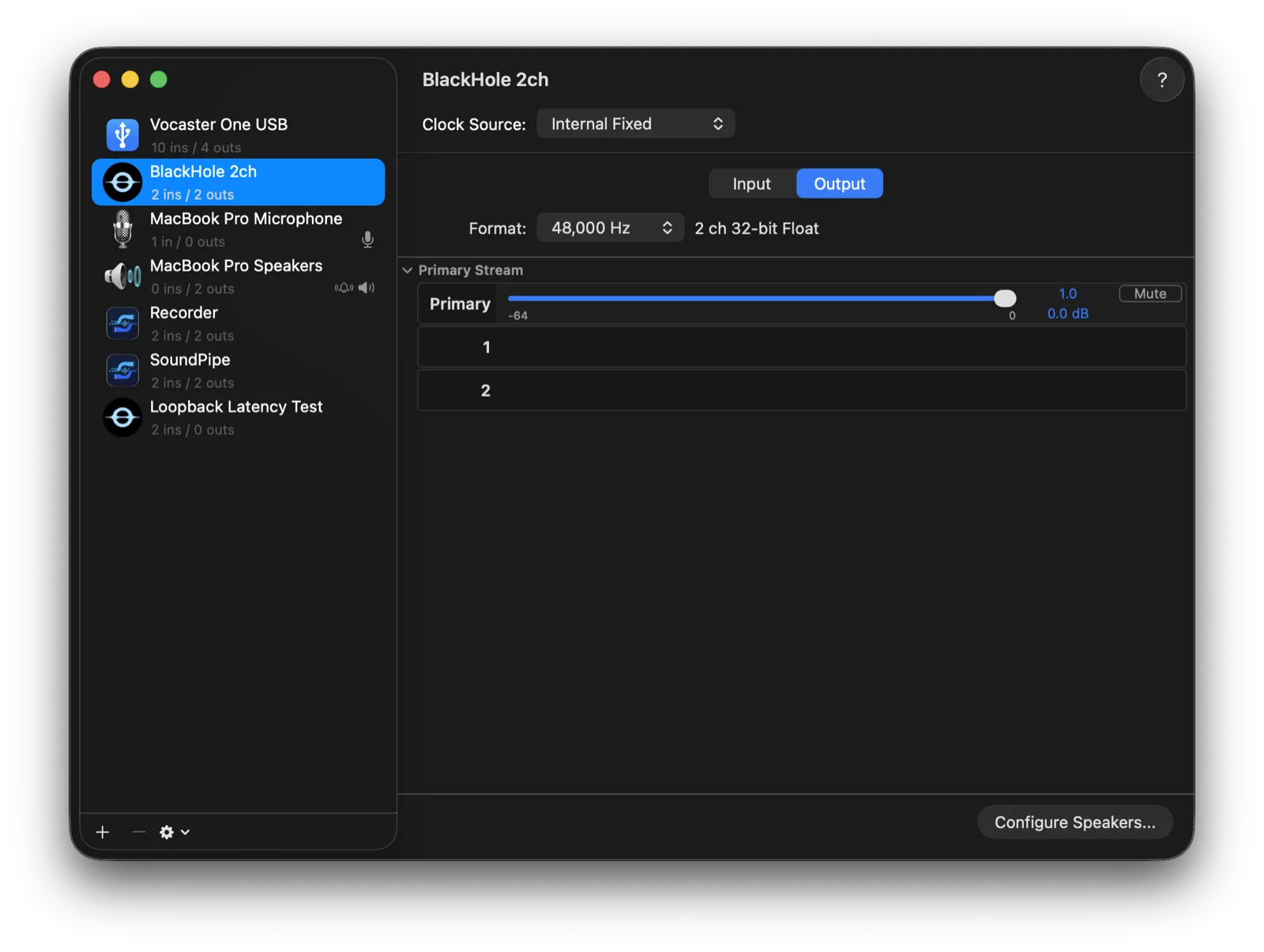
That includes carrying on with Soundflower's rough edges, because BlackHole inherits the workflow along with the job. It's a driver, not an app: no window, no volume control, no way to hear what you're routing without hand-building a multi-output device in Audio MIDI Setup. Every device in the chain must run at the same sample rate or you get silence or crackle, and the channel count is fixed per build (2ch, 16ch, and 64ch are separate installers), just like Soundflower's fixed 2ch and 64ch devices.
If that never bothered you, stop reading and install BlackHole. It's excellent.
2. SoundPipe: the same job without the manual setup
SoundPipe exists for the people who used Soundflower but never loved the Audio MIDI Setup part. It's a modern virtual audio driver plus the app Soundflower never had: create up to 16 devices, rename and resize them live (2 to 64 channels), and wire apps, microphones, and outputs together by dragging.
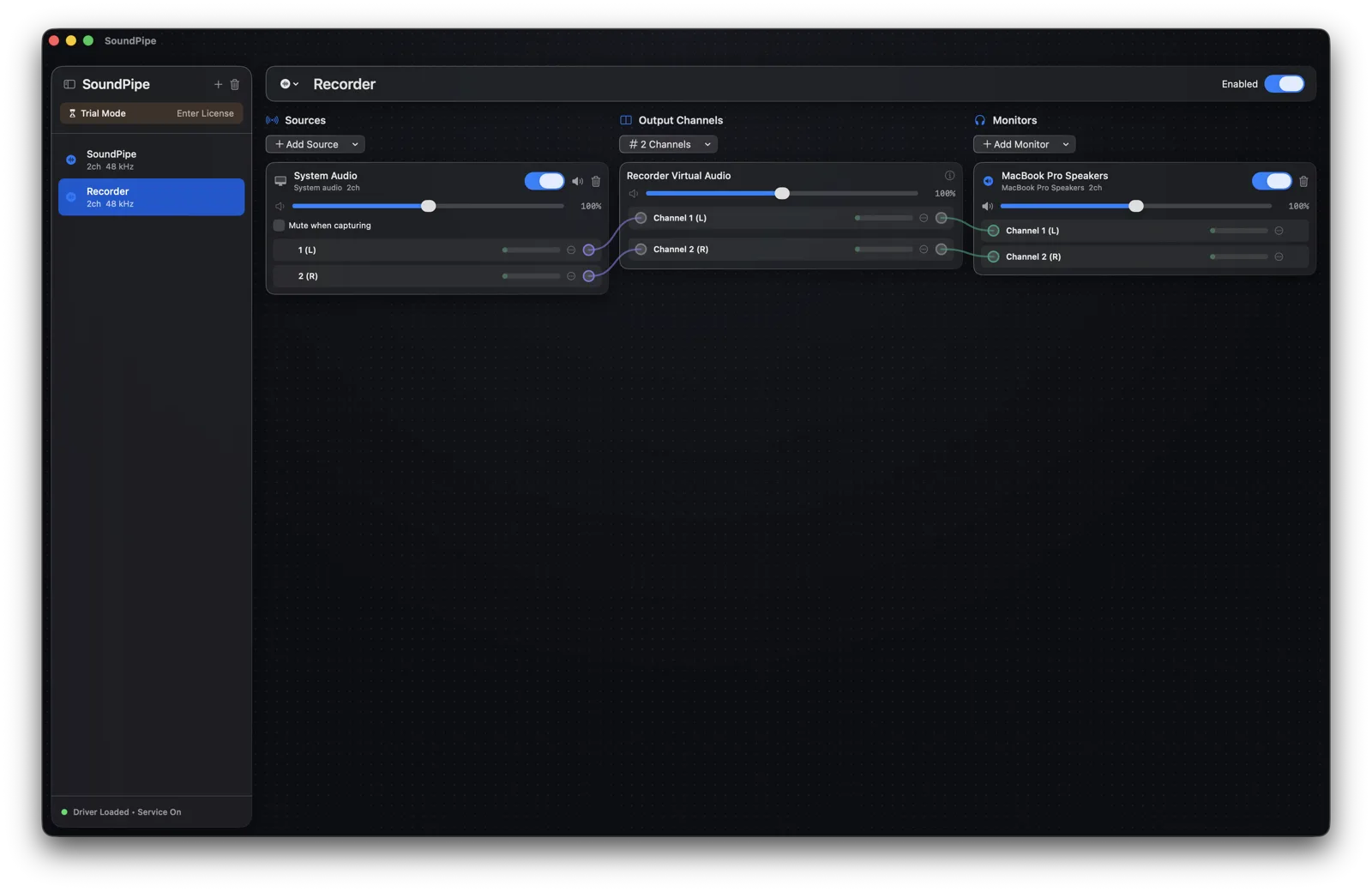
The differences from the driver-only approach, in practice:
-
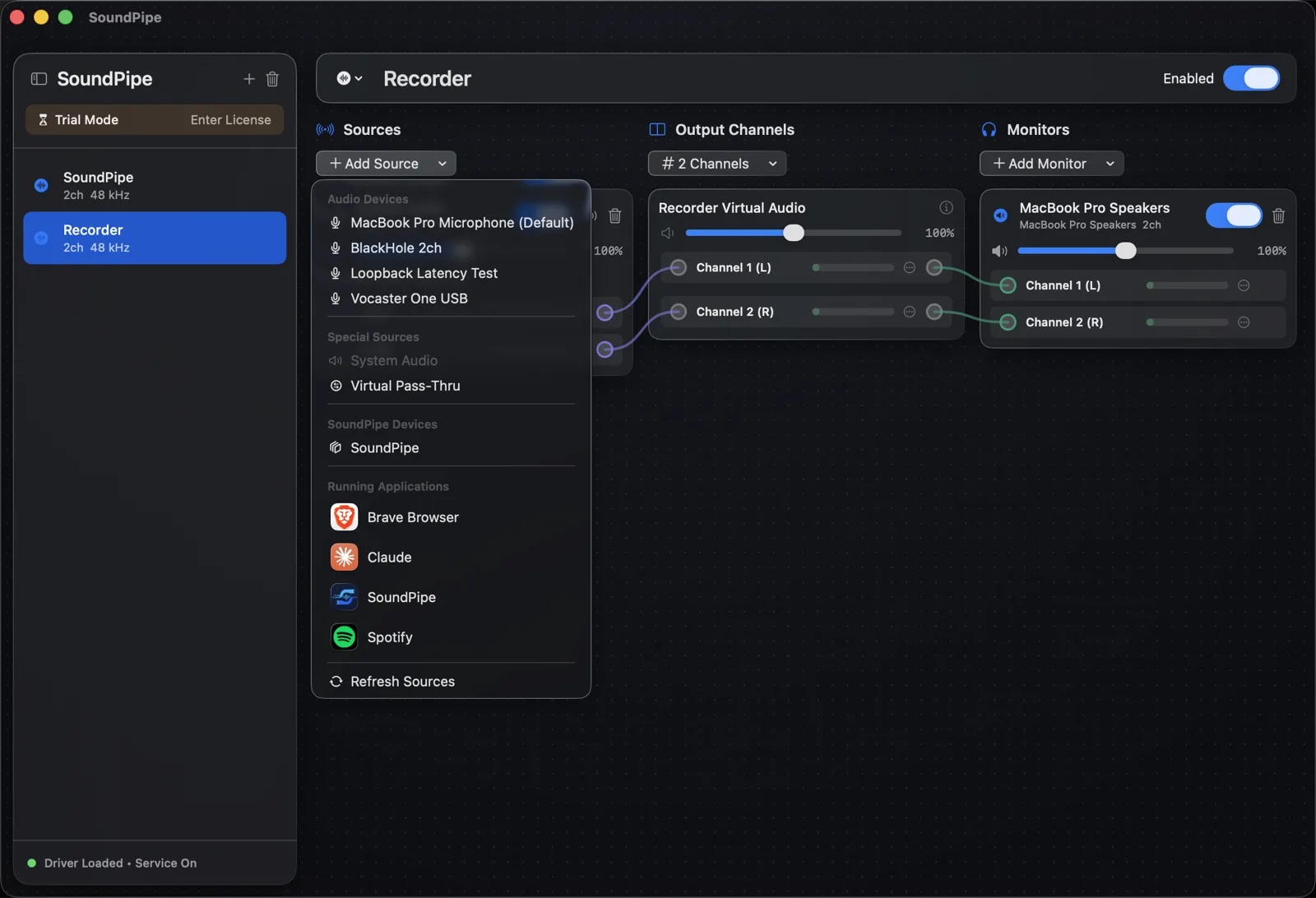
Per-app capture. Route just Spotify or just the call. Soundflower and BlackHole only see whatever you point your system output at.
-
Monitoring built in. Hear what you route through your headphones or speakers directly. No multi-output devices, and your volume keys keep working.
-
Per-channel volume and live meters, so you can balance sources without touching the apps producing them.
-
Sample rates handled automatically, with latency under 15 ms. The classic Soundflower crackle is an entire category of problem that just goes away.
It's $10 once, the license covers 3 Macs, and the trial is the complete app in 20-minute sessions, restartable as often as you like. Download SoundPipe free and run your old Soundflower workflow through it before paying anything.
3. Audio MIDI Setup: check what's already on your Mac
Before installing anything, know what macOS can do on its own. Audio MIDI Setup (in /Applications/Utilities) builds two kinds of combined devices: a multi-output device plays the same audio on two or more outputs at once, and an aggregate device merges several physical devices into one for DAWs.
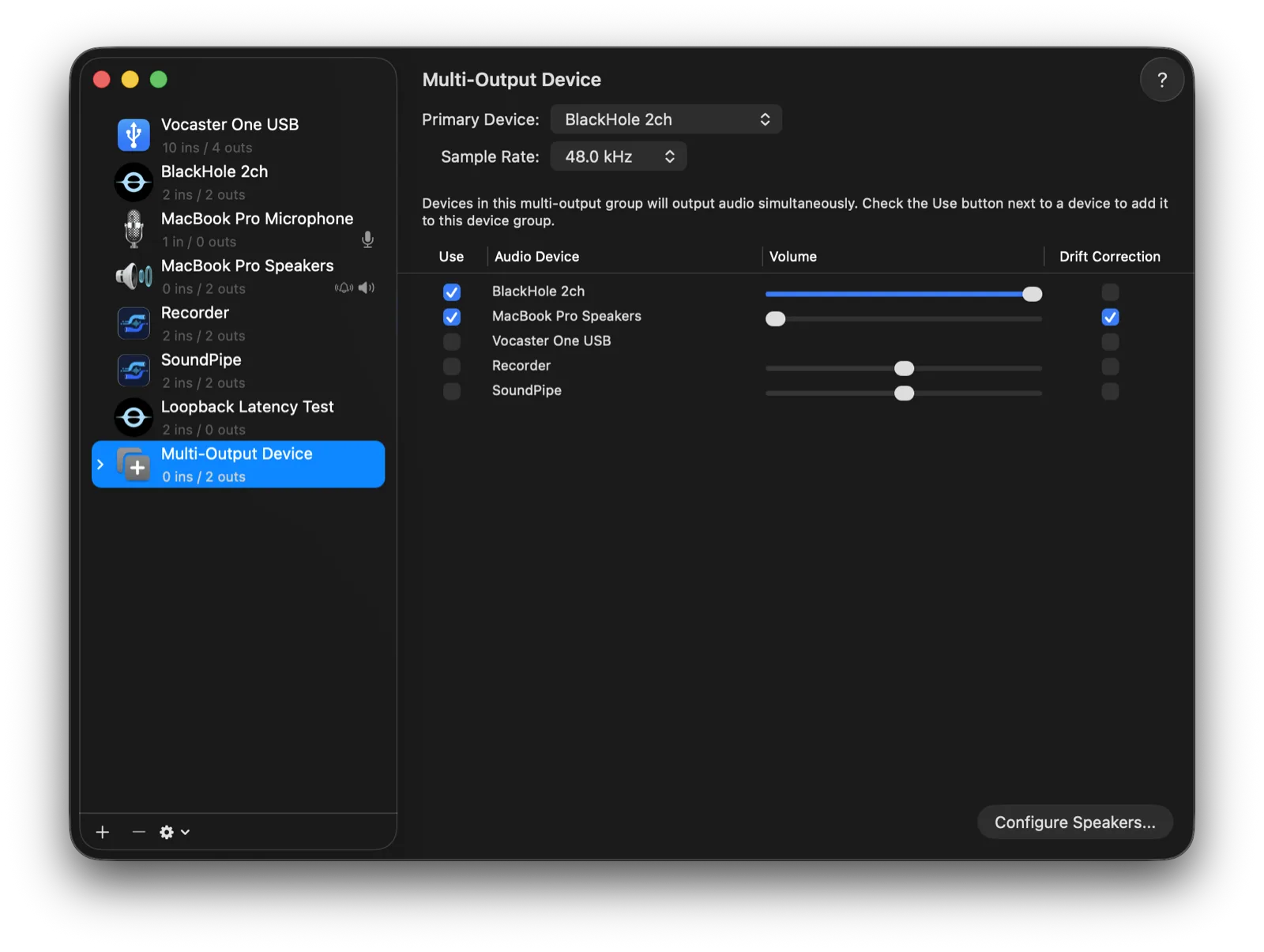
What it cannot do is Soundflower's actual job: it creates no loopback device, can't capture app audio, and can't route sound between apps. But if your entire reason for installing Soundflower back in the day was "I want sound on the speakers and the HDMI output at once," you no longer need to install anything at all.
4. Loopback: the professional option
Loopback ($99) by Rogue Amoeba is the deepest routing app on the Mac: virtual devices, per-app capture including multichannel, and a polished wiring canvas, refined for a decade. Rogue Amoeba also hosts Soundflower's legacy project page, which tells you how they see the market: Loopback is their answer to everything Soundflower used to do.
It's genuinely great software. It's also $99, which is a lot if Soundflower's free feature set was all you ever needed. If you work in surround or your setup has real edge cases, it earns the price; our best Loopback alternatives post covers that decision in depth.
5. Audio Hijack: when recording was the actual goal
A large share of Soundflower installs only ever existed to record system audio into QuickTime or Audacity. If that's you, consider skipping the virtual-device model entirely: Audio Hijack ($69) captures audio from any app or input straight into a block-based pipeline of recorders and effects, no routing setup required.
It doesn't create system-wide virtual devices other apps can select, so it can't replace Soundflower for live routing between apps. For pure recording it's arguably the nicest tool on this list. And if you want the recording recipes for every option here, free ones included, see our guide to recording internal audio on a Mac.
How to uninstall Soundflower
Whichever replacement you pick, clear the old kext out first:
- If you still have the Soundflower DMG, run the Uninstall Soundflower script inside it and restart.
- If not, delete
Soundflower.kextfrom/Library/Extensions(you'll need an admin password) and restart your Mac.
After the reboot, the Soundflower devices disappear from your sound settings and Audio MIDI Setup.
Bottom line
- Want exactly what Soundflower was, free and modern? BlackHole.
- Just need sound on two outputs? Audio MIDI Setup. It's already installed.
- Recording-first workflow? Audio Hijack.
- Surround or edge-case routing? Loopback.
- Soundflower's job minus the fiddling? Try SoundPipe free: the full app in 20-minute trial sessions, $10 once if it fits.